Release Notes > 6.3.0
Webiny 6.3.0 Changelog
See what's new in Webiny version 6.3.0
 release on GitHub.
AI PowerUps
AI-Powered Page Content Generation (#5125,#5117,#5113,#5111)
Webiny now includes AI-powered content generation capabilities through the new AI PowerUps feature. You can configure AI providers (OpenAI, Anthropic) and define personas in the Admin settings, then use AI to generate page content directly within the Page Builder.
The feature includes:
- Provider configuration — set up connections to OpenAI or Anthropic with your API keys
- Personas — define reusable AI personas with custom instructions for different content styles
- Content generation — generate page sections and content using natural language prompts
- Tool pipeline — AI-generated content is automatically processed through tools that convert text to Lexical editor format and resolve images
AI Image Enrichment for File Manager (#5104,#5123)
Images uploaded to the File Manager are now automatically enriched with AI-generated metadata:
- Tags — AI analyzes the image and assigns relevant tags for improved searchability
- Description — a human-readable description is generated and stored with the file
Both fields can be viewed and edited manually in the file details panel. This runs as a background task after upload, so it doesn’t block the upload process.
Admin
API Playground Renamed to GraphQL Playground (#5103)
The “API Playground” label in the admin interface has been renamed to “GraphQL Playground” for clarity.
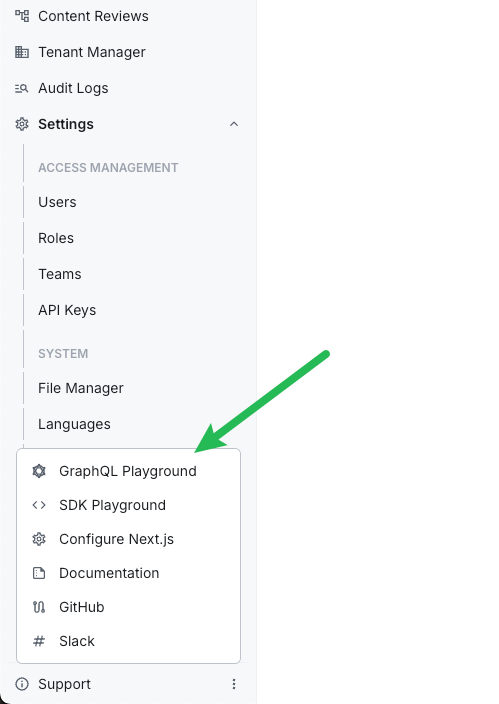 GraphQL Playground in the admin interface
Extended Form Model Capabilities (#5125)
The Admin form system now supports additional field types and layout options:
- Object fields — group related fields into nested structures
- Vertical tabs renderer — organize form sections into vertical tab layouts
- Textarea renderer — multiline text input
- Passthrough renderer — render custom components within forms
Development
Typescript Upgraded to 6.0.2 (#5043)
Webiny now uses Typescript 6.0.2 with module resolution set to bundler. This brings improved type inference and better alignment with modern bundler toolchains.
Install Version Flag for Upgrade Command (#5115)
The webiny upgrade command now accepts an --install-version flag, letting you specify an exact package version to install during the upgrade process. This is useful when you want to test an unstable release before the stable version ships.
Old Pulumi Plugin Versions Now Cleaned Up (#5101)
Previously, downloading new Pulumi plugins would leave old versions behind, causing the .webiny/pulumi-cli folder to grow over time. Old plugin versions are now automatically removed when newer versions are installed.
Feature API Types Corrected (#5108)
The second parameter in the Feature API’s register method now correctly populates when defined via generics.
Webiny SDK
Tasks SDK Methods (#5125)
New SDK methods are available for working with background tasks:
Development
ExportuseEnvHook From@webiny/project-aws(#5139)
The useEnv hook, which provides access to the current deployment environment context within infrastructure code, was not exported from the @webiny/project-aws package. It can now be imported directly:
ExportuseBuildParamsFrom Main Admin Entry Point (#5136)
The useBuildParams hook was previously only importable from a sub-path (webiny/admin/build-params) and was missing from the main admin package exports. It is now available from the standard webiny/admin import path, consistent with all other admin hooks:
The sub-path export is now deprecated.
Download Folder From S3 No Longer Requires AWS Credentials (#5127)
Installing extensions from a public S3 bucket previously failed when AWS credentials were present in the environment (e.g. in GitHub Actions) but lacked access to the examples bucket. Downloads now go over plain HTTPS, with no dependency on IAM permissions.
Upgrade Command Always Logs Full Output (#5126)
The webiny upgrade command now always outputs full logging information during execution, making it easier to diagnose upgrade issues.
Webiny SDK
Added Tasks SDK Module (#5106)
External applications can now interact with Webiny Background Tasks through the SDK. The new sdk.tasks module lets you list task definitions and runs, retrieve execution logs, trigger new tasks, and abort running tasks:
The SDK playground includes full TypeScript declarations for the new module, providing autocomplete and type checking.
Infrastructure
Added Production Environment Helpers and Encryption Guardrail (#5129,#5131)
New project templates now include encryption preconfigured for production environments, and deploying to production without encryption configured will fail with a clear error message. Two new components make it easier to scope infrastructure config to production environments:
Previously, users with multiple production environments had to repeat the full list of environment names at every Infra.Env.Is usage site.
Added Encryption Service (#5109,#5112)
A built-in encryption service is now available in the Webiny API layer. Developers can inject Encryption into any API feature to encrypt and decrypt strings using AES-256-GCM:
The encryption passphrase is optional — when not configured, encrypt and decrypt pass values through unchanged, allowing teams to adopt encryption gradually.
Fixed OpenSearch Domain Being Recreated on Re-Deploy (#5137)
When a Pulumi resource name prefix was configured (or when upgrading from an older version of Webiny), the OpenSearch domain physical name could change between deploys, causing Pulumi to destroy and recreate the entire cluster. The domain name is now persisted in the stack output and reused on every subsequent deploy to keep it stable.
Fixed Duplicate Pulumi Resource URN Error When Registering Multiple API Routes (#5135)
Deploying two or more Api.Route extensions at the same time caused a “Duplicate resource URN” error during pulumi up, preventing the deployment from completing. Multiple API routes can now be registered and deployed without conflict.
Headless CMS
Introduced AI Service (#5096)
A first-class Ai service is now available in the Webiny API framework, providing a single, DI-friendly abstraction for working with language models across multiple providers. The service wraps the Vercel AI SDK and includes built-in provider factories for Anthropic and OpenAI:
Configure providers via environment variables:
WEBINY_API_ANTHROPIC_API_KEYWEBINY_API_OPENAI_API_KEY
Switching providers or models requires only changing the model string.
Admin
Added Dev Tools Sidebar Section (#5130)
The GraphQL Playground and SDK Playground links have been moved from the Support dropdown menu into a new Dev Tools section in the sidebar. Access to each tool can now be managed through the Security permissions panel. The Support dropdown has been removed; the Upgrade link is now a standalone footer item, and Configure Next.js has moved into the Website Builder section.
Added Auto-Scrolling to Dialogs (#5134)
All dialogs now automatically add a vertical scroll bar when content exceeds available height. To disable auto-scrolling, pass scrollable={false} to the dialog component.
Tenant Manager Use Cases and Features Now Exported From Public API (#5140)
The tenant manager’s use case classes, feature plugins, and TypeScript interfaces are now exported from both webiny/tenant-manager and the main webiny/webiny package. This enables developers to extend or override tenant management behavior — including getting the current tenant, fetching by ID, creating, updating, enabling, disabling, and installing tenants.